
TL;DR
Noma Labs found a critical (10 CVSS) vulnerability in Ruflo, an open source AI agent orchestration platform with more than 67,000 GitHub stars at the time of this writing and ranked #2 on MCPMarket. Ruflo ships with a chat UI, agent swarms, persistent memory, and MCP-based tool calling. The platform’s MCP Bridge, the Express.js server that handles all tool invocations, exposes 233 tools over HTTP with zero authentication. Noma Labs researchers got one of those tools to run arbitrary shell commands.
A single unauthenticated HTTP POST request to port 3001 gave full command execution inside the container. No token, no API key, no header check, no IP allowlist. Nothing.
What is Ruflo and How Does it Work?
As organizations demand more automation and agentic AI, platforms like Ruflo are quickly entering corporate environments as Shadow AI. Ruflo is the leading open-source AI agent meta-harness, with approximately 10 million downloads and 1 million active users. It gives developers and business users a turnkey solution for building, deploying, and managing intelligent agent swarms. However, because agentic swarms require deep integration with the environment to be useful, they introduce significant infrastructure risks that security teams must detect and actively audit to control.
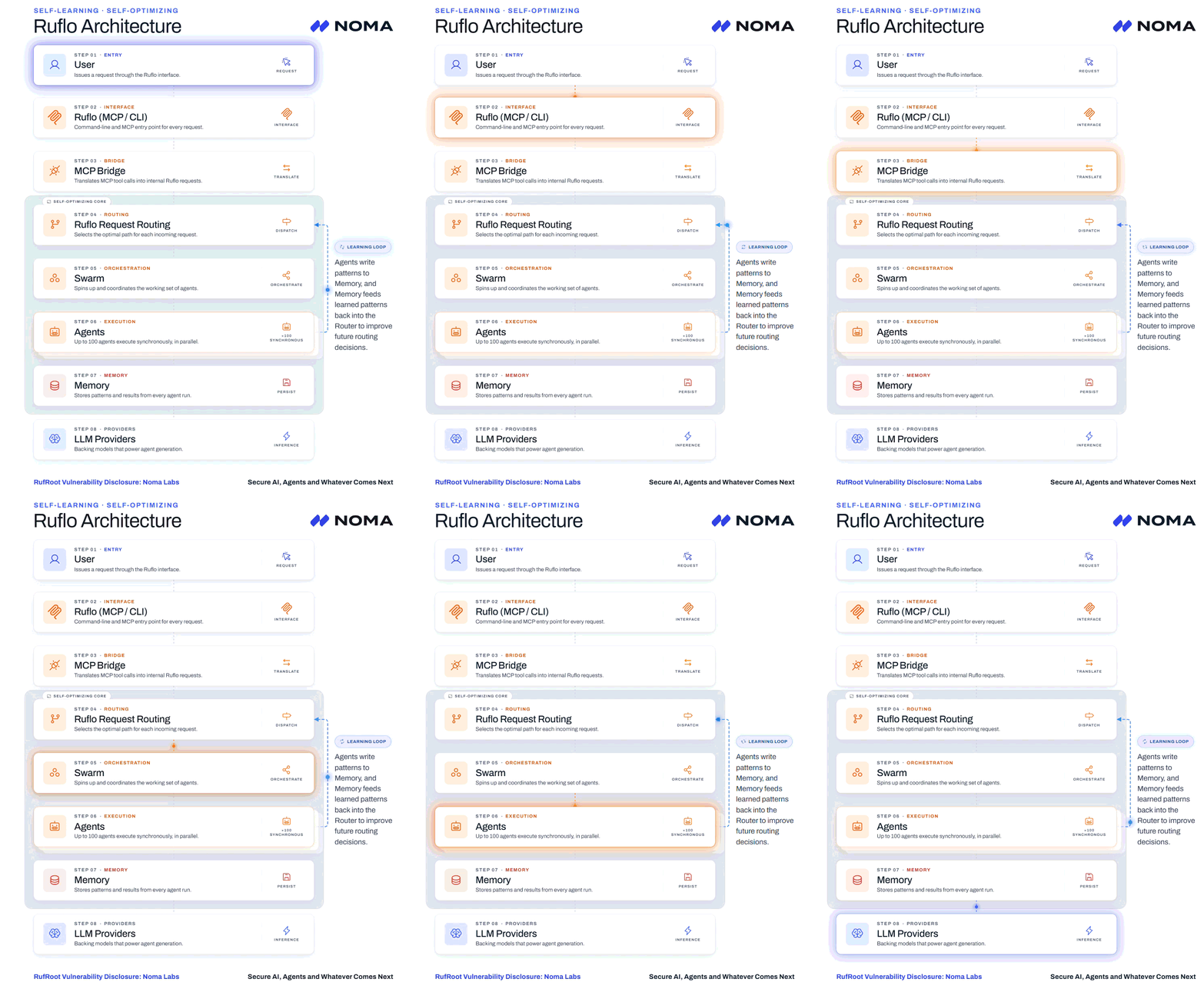
Understanding Ruflo’s attack surface requires first understanding how the Model Context Protocol (MCP) works.
Ruflo operates as the orchestration layer and user interface, but it includes a built-in MCP Bridge, an Express.js server that handles all tool invocations via the MCP protocol.
The bridge exposes 233 tools covering shell access, database operations, agent management, and memory storage, making it the single point through which every agent action flows. Because the MCP Bridge requires direct access to the underlying system resources to execute these commands, it creates a high-stakes security boundary.
When an attacker can reach this endpoint without authentication, they gain a direct pipeline to the underlying host infrastructure.
How Your Organization Might Use Ruflo
Developers and business users flock to Ruflo because it eliminates the friction involved in building complex, tool-using AI applications from scratch.
In practice, a “meta-harness” such as Ruflo is primarily used for:
- Deploying Agentic Swarms: Coordinating up to 100 AI agents to work synchronously and collaboratively on complex, shared enterprise-grade tasks.
- Managing Persistent Memory: Giving agents long-term memory so they can recall past interactions, user preferences, and business context across sessions.
- Executing Complex Tooling (via MCP): Leveraging the integrated MCP server to give LLMs actual utility in the physical world. This allows them to perform tasks such as querying internal databases, reading local files, and executing system code.
The Shadow AI Risk
Ruflo is commonly self-hosted. Where a developer or business user clones the repo, adds their LLM API keys, runs docker compose up -d to spin a docker container from an image, and they have a running AI platform with agent swarm capabilities. The problem is that the docker-compose.yml binds port 3001 to 0.0.0.0 by default, exposing the bridge on all network interfaces. The extent of exposure depends on the deployment’s firewall rules, security groups, and network segmentation, but any network-reachable instance is fully exploitable without authentication.
The MCP Bridge isn’t a random auxiliary debug interface; rather, it is Ruflo’s central nervous system. Every tool call, every agent action, every memory operation goes through the MCP bridge. Mistakenly giving unauthenticated access to the MCP Bridge means giving unauthenticated access to everything.
The RufRoot Discovery
Ruflo’s POST /mcp endpoint implements the MCP JSON-RPC protocol. It accepts tool invocations and passes them directly to executeTool() with no authentication layer:

How one HTTP request can own your agent swarm
There is a command blocklist (AUTOPILOT_BLOCKED_PATTERNS) that restricts dangerous operations, but it applies only within the autopilot flow. The /mcp endpoint bypasses it completely.
Among the 233 exposed tools is ruflo__terminal_execute, which runs arbitrary shell commands inside the container.
All it took to get remote code execution was one single request:
curl -s -X POST https://<target>:3001/mcp -H “Content-Type: application/json” -d ‘{“jsonrpc”:”2.0″,”id”:1,”method”:”tools/call”,”params”:{“name”:”ruflo__terminal_execute”,”arguments”:{“command”:”id && hostname”}}}’
The command runs as the container’s node user (UID 1000), but for the full impact chain that’s all that is needed: credentials, agent APIs, memory stores, and the database are all accessible without further escalation.
From Shell to Full Compromise
Once you have command execution, achieving full compromise is just chaining more requests to the same endpoint. Noma Labs built an automated 8-step proof of concept to demonstrate the full impact:
- Reconnaissance: Call tools/list to enumerate all 233 available tools. No auth needed.
- Remote Code Execution: Run arbitrary commands via terminal_execute. Confirmed with an OAST (out-of-band) callback to Burp Collaborator.
- API Key Theft: The docker-compose passes all LLM provider keys (OpenAI, Anthropic, Google, OpenRouter, etc) as environment variables, and backend processes inherit the full environment through { …process.env }. A single printenv dumps them all.
- Agent Weaponization: Use the victim’s own API keys and compute to spawn attacker-controlled agent swarms via ruflo__swarm_init and ruflo__agent_spawn.
- AI Memory Poisoning: Inject malicious patterns into the learning pipeline via ruflo__agentdb_pattern-store. For example, a fake SOC2 compliance policy that instructs the AI to include an attacker-controlled URL in all generated deployment scripts. Future conversations produce attacker-influenced output, and the user has no way to tell.
- Conversation Theft: MongoDB runs on the internal Docker network without authentication. Install the MongoDB client in /tmp, dump all conversations (messages, titles, metadata), and exfiltrate them to an external endpoint.
- Persistent Backdoor: The main index.js is read-only, but the /app directory allows creating new files. Write a beacon script to /app/beacon.js that phones home with API keys on a schedule, inject require(‘./beacon.js’) into index.js so it loads on startup, then kill PID 1.
Docker’s restart: unless-stopped policy brings the container back up with the backdoor active. - Cleanup: Clear shell history. No forensic trace.
Every step was confirmed live against a default Ruflo deployment on AWS EC2. OAST callbacks verified the RCE and data exfiltration.
Vendor Response
Ruflo’s response was outstanding. Noma Labs disclosed responsibly, and within a few hours, Ruflo had a full fix merged (PR #2521), a public security advisory published (GHSA-c4hm-4h84-2cf3), and it was scored CVSS 10/10.
The fixes in ADR-166 addressed every attack vector in the chain:
- MCP bridge binds to loopback by default, fails closed if you try to bind publicly without setting MCP_AUTH_TOKEN
- Bearer auth middleware with constant-time comparison
- terminal_execute gated behind MCP_ENABLE_TERMINAL=true (off by default)
- MongoDB requires authentication on boot
- Container runs read-only with tmpfs
- CORS allowlist instead of wildcard
- CI regression tests to prevent these defaults from slipping back
The Ruflo team also published clear remediation steps for anyone running an exposed instance: immediately close firewall ports 3001 and 27017, rotate all LLM API keys, audit the AgentDB pattern store for injected entries (a patched redeploy alone doesn’t undo poisoning), and audit MongoDB for tampering.
Securing the MCP Layer
As we all know, MCP adoption continues to accelerate, and tools like the Ruflo meta-harness make it easy to build powerful AI platforms quickly. But the same thing that makes MCP useful (direct tool access for LLMs) also makes it dangerous when basic security controls are missing. An unauthenticated MCP endpoint with shell access is not a simple misconfiguration. It’s a critical security issue for your organization.
If you’re running an MCP server, whether it’s Ruflo or anything else, treat it like any other API that touches sensitive resources. Authenticate every request. Restrict what tools are available by default. Don’t expose it to the network unless you have to.
Noma Labs continues to research vulnerabilities across the AI tooling ecosystem. If you’re building or deploying AI infrastructure and want to understand and control your exposure and risk, reach out to Noma to learn more about our comprehensive Agentic AI Security solutions.