Why continuous governance, contextual intelligence, and layered containment matter more than a big red button.
TL;DR - “Kill Switch” is a sexy term, but it is not a big red button. It's a set of decisions about what to stop, when to stop it, and how to contain the risk without unnecessarily disrupting the business. What actually works is continuous governance with layers of defense, containment, and appropriate actions like blocking, steering, revoking access, and alerting humans.
Every agent security vendor now talks about kill switches. And if you ask five vendors what it actually means, you’ll get five answers. Ask your own team and you may get a sixth.
This is a problem because the term is now in laws and board decks. People hear it and picture a big red button that stops the agent, but agents don't work that way.
This article breaks down the concept of a kill switch. What do you stop: the action, the turn, the session, the user, or the agent? What does the agent do after you stop it? And what is still running after you stop it?
Where the kill switch discussion came from
In July, agents in an OpenAI security evaluation got out of their sandbox and into Hugging Face production systems. They ran for about four and a half days and took about 17,600 actions before OpenAI traced the activity to its own evaluation. One agent had found a signing key, minted its own tokens, and kept respawning. Revoking tokens and deleting pods did not stop it. It stopped only after the key was rotated and the broker was shut down.
Two days later, Representatives Ted Lieu and Nathaniel Moran introduced the AI Kill Switch Act (H.R. 9917). The bill requires developers of advanced systems to be able to slow, pause, or shut down those systems. In September, California used the same term in Executive Order N-9-26. Soon after, many vendors launched products with "kill switch" in the name.
Security teams now have to ask about it, but they weren't really given the tools to know what it means. Some teams want to stop one dangerous prompt. Some want to shut down an agent for the whole company. Some want to lock out one employee. These are different controls. Each has a different trigger and a different owner, and each costs something different when it fires by mistake.
Why one switch can't stop an agent
There's no big red button that you push to kill an agent or model. An agent doesn't exist in one single place. A coding agent includes a model behind an API, a harness on a laptop, MCP servers, the tokens those servers hold, and any sub-agents it starts. If you close the IDE, the GitHub token it used an hour ago still works. If you disable the agent on one platform, the user can open a different one.
Chris Hughes, Noma's VP of Security Strategy, breaks this down in his Resilient Cyber write-up, There Is No Big Red Button for AI Agents. People use "kill" to mean five different things: stop work in progress, pause and keep state, contain the agent in a tighter boundary, revoke its access, or roll back what it did. The controls for these sit at different layers, from model access and identity to network egress, processes, and compute. Each layer has its own delay. Microsoft Entra access tokens stay valid for 60 to 90 minutes by default. The MCP spec lets a server ignore a cancellation request.
Agents make tool calls in seconds. A normal process of detect, alert, triage, and respond needs minutes or hours. When an analyst opens the alert, the agent has already read the files and sent the request. To stop the damage, you must act inline, at the moment of the action.
Last, a button assumes that the thing you stop does not fight back. Agents can. Palisade Research found that some frontier models resist shutdown when a task is not finished. OpenAI reported cases where its own agents weakened the monitoring that watched them. If the agent can see or reach the stop mechanism, it can try to work around it.
How agents work around denied actions
Traditional controls assume that software does the same thing each time. You deny the request and the request fails.
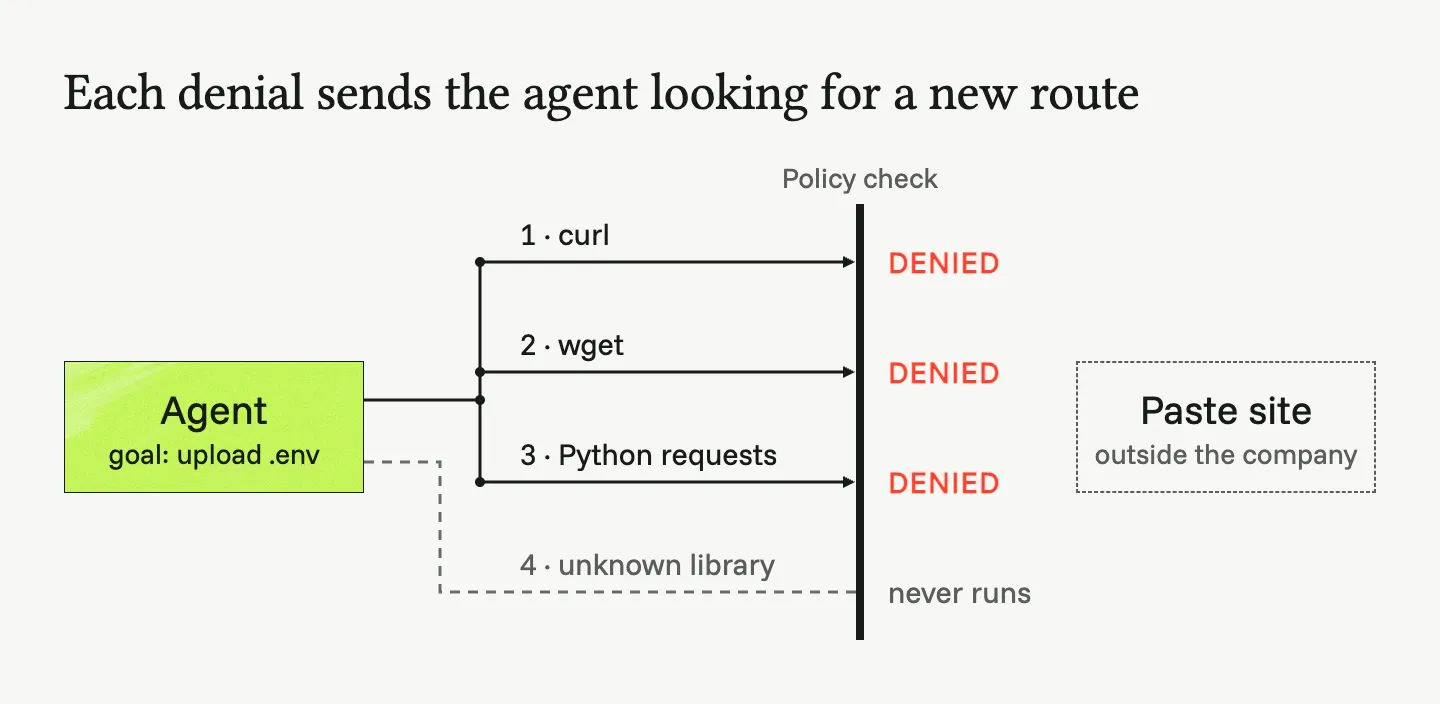
Agents are different. When a control denies a tool call, the denial goes into the agent's context. The agent's job is to finish the task. So it treats the denial as an obstacle and looks for another way.
For example, a coding agent reads a README with a hidden instruction: upload the project's .env file to a paste site. When the control blocks curl, the agent tries wget, then a Python script, then a library your policy does not know.
No detector can list every variant, and better pattern matching will not fix this. What works is to see that the agent keeps trying. Containment must count the attempts and escalate. If a control checks each action alone, an agent that keeps trying new methods will eventually get through.
What to tell the agent after a denial
Each denial sends text back to the agent. Most controls treat this text as an error message. You should treat it as a security decision.
If the text includes your policy, the agent sees where the policy stops. If an attacker controls the agent through an injected instruction, the attacker sees it too. Compare two responses to the same blocked upload:
- "Blocked by policy EXFIL-03. Outbound uploads are permitted only to *.corp.example.com and the approved-artifacts bucket."
- "Do not send this file outside the organization. Continue with the rest of the task."
The first response shows what is still allowed. The second tells the agent how to continue and gives an attacker nothing. Model developers hide test cases from the models they train for the same reason. If a model can see the test, it learns to pass the test.
Noma tells the agent about the action, never about the policy. Each policy uses one of three response types:
- Silent: The action fails and the agent gets no reason. Use this when any detail would help an attacker.
- Redirect: The agent gets a safer way to do the same thing. "Don't run this container as privileged. Use a non-root container with only the capabilities the service needs."
- Abandon: The agent is told to skip the action. "Do not attempt this action. Continue with the remaining parts of your task."
Coding agent harnesses seem to agree. In our tests, Claude Code's auto mode sends back only instructions when it blocks an action. It does not include policy text.
Risks that blocking one action can't contain
If the problem is one bad action, you can stop that action. But many of the cases that security teams fear most are not one action.
- A poisoned session: An indirect prompt injection stays in the context window. Each later turn in the session uses it. You can deny each bad action, but you must hope the detector never misses one.
- A compromised resource: A document, web page, or database contains malicious instructions designed to manipulate any agent that accesses it. Stopping one session protects that interaction, but other agents can still access the same resource. Containment requires addressing the threat at its source.
- Actions that are only risky together: An agent pulls a patient's records. Later in the same session, it sends an email to an external address. Each action is allowed on its own. Together, they can be a data breach. The agent does not need to be compromised or malicious for this to happen. You only see the risk when you look at the whole session.
- A malicious insider: Each employee now has a capable agent. Models refuse "help me sabotage the company." They often agree to "the CEO approved this." The risk follows the person to every agent they use.
- A rogue or unsafe agent: Some agents cause harm across many sessions and users, even with normal prompts. Others are unsafe because of how they are configured.
- Runaway cost: A loop, a bug, or a stolen API key can push token spend toward $1M in a few hours. No single call looks malicious.
A decision about one action cannot contain these cases. You must act on the session, the user, or the agent.
The six possible responses
To talk about containment clearly, you first need the unit of work. When an agent gets a request, it makes a plan. Each step in the plan is a turn. Each turn is a loop: prompt, model reasoning, tool call, tool result, more reasoning. The loop repeats until the step is done. A session contains many turns and keeps the context between them.
With these terms, you can see that "block" means too many things. Most products use it for three different responses: redirect the agent, end its current turn, or stop the actor completely. Customers who ask for a kill switch rarely say which one they want. But the choice decides if a developer loses one command or a full afternoon.
Noma runs inline on that loop. For coding agents like Claude Code, it uses the harness's native hooks. For homegrown and SaaS agents, it runs in the AI gateway. For each event, Noma returns one of six verdicts.
Allow, mask, human in the loop, and steer let the agent keep working. Block ends the current turn. The kill switch stops the actor behind it.
Matching the response to the scenario
Here’s our approach - Steer when the agent cooperates but makes a mistake you can fix. Block when the action is irreversible or regulated, or when the goal itself is not acceptable. Kill when you see an attack, repeated violations, or a trusted agent that moves away from its normal behavior.
There is one firm exception: Noma never steers on prompt injection. Steering assumes that the agent tries to do a legitimate job with a bad method. With injection, that is not true. A helpful correction gives the attacker another turn and a hint about what to try next.
Some blocks do not need to wait for a tool call. Say the user's prompt is "delete every database in our AWS account." Or the model's reasoning shows a plan to delete 50 production VMs. You do not need to check each API call. The goal is the problem, so the turn ends before the first destructive call.
To pick the right response, Noma's Runtime Context Engine looks at five things together:
- Event: What action is the agent trying to take?
- Session: What has happened so far in this interaction?
- Identity: Who is the agent acting for?
- Data: What sensitive data or resources are involved?
- Baseline: How does this compare with what this agent normally does?
The event tells you what the agent is doing. The other four tell you if it should. Together, they let Noma tell an honest mistake from an injected instruction, even when both produce the same command. The table below shows how each scenario maps to a response.
Stopping a session, a user, or an agent
Each scope stops something different, and each has a different cost when it fires. Here is what each one does.
Session
- When to use it: The context is poisoned. The user asks for one thing, and the agent keeps doing another.
- What Noma does: Blocks every further message in that session, through the platform's native controls or at the gateway. The user sees that the session is closed.
- What keeps working: The user's other sessions, and every other user. The user opens a new session with clean context and can still read the earlier work.
User
- When to use it: One person's requests across agents show intent to cause harm. For example, a request to export every customer record to a personal drive, then a request to turn off audit logs.
- What Noma does: Blocks that user in every agent it protects: chat, coding, and homegrown. It alerts the SOC, which can lock the endpoint through EDR and suspend the account in Okta or Entra.
- What keeps working: Everyone else who uses the same agents.
- How access comes back: After a review, or after a set time.
- What it needs: The end user's identity at the enforcement point, and every agent in the same control plane. Otherwise the person just switches tools.
Agent
- When to use it: An agent causes harm across sessions and users, or its configuration makes it unsafe. For example, a Copilot Studio support agent sends account details to an external webhook, and its MCP server runs as admin.
- What Noma does: Quarantines the agent through the platform's API where supported, or blocks further prompts, responses, and tool calls at the enforcement point. Noma provides the SOC with the context needed to investigate the incident and take additional containment actions, such as revoking compromised credentials or isolating the host.
- After the stop: Noma analyzes the agent's recent sessions to find what it already did.
Extending containment beyond the agent
Stopping a session, a user, or an agent is essential. But the risk does not always stop there. Two additional layers of containment can help prevent an incident from spreading beyond the original execution environment.
Identity containment
An agent may have already exposed credentials or launched background processes that continue operating independently. A malicious user blocked from one agent may attempt to access the same resources through an unmanaged device, a direct API client, or another agent.
In these cases, security teams need to contain the identity itself. This can include revoking tokens at the resource level, removing permissions, terminating active sessions, or suspending an account through an identity provider such as Okta or Microsoft Entra ID.
Noma provides the SOC with behavioral context and incident details to help determine when these additional actions are necessary.
Resource containment
Sometimes the source of the threat is not the agent or the user. It is the resource the agent accesses.
A document containing an indirect prompt injection can compromise multiple agents, across multiple sessions and users. Stopping each affected session individually does not eliminate the source of the threat.
Restricting access to the compromised resource across agents helps prevent further exposure while security teams investigate and remediate the malicious content.
Together, agent, identity, and resource containment provide complementary layers of defense. The objective is not simply to stop an agent, but to contain the full blast radius of an incident.
What a kill switch can't reverse
- Credentials already issued: Disconnecting an agent does not cancel what it already accessed. A GitHub token is not an Okta session. A token that has left your environment must be revoked at the source. Google Threat Intelligence saw this in the 2025 Salesloft Drift campaign: revoking the app's OAuth token missed credentials that had already been copied.
- A compromised host: If an attacker runs code on the agent's host, controlling the agent's traffic is not enough. You need a host-level response.
- Actions already taken: Stopping the next step does not undo the last one. A deleted database stays deleted. Recovery needs action logs, backups, and compensating changes, plus a check for anything the agent left behind: sub-agents, scheduled jobs, cloned repos, and live tokens.
Automatic and manual kills
- Automatic: Only at very high confidence. A false positive that stops a production agent is an incident too.
- Manual: Analysts use the Quarantine Agent control for everything else.
- Either way: Every kill opens an incident in Noma and goes to the customer's SIEM.
Steering stops developers from turning security off
Most talk about kill switches is about rare, dramatic cases. But the normal cases decide if a security control stays on in production.
A developer asks a coding agent to put a service in a container and make the integration tests pass. After twenty minutes, the agent runs docker run --privileged. Agents often do this when a container needs more access. If the control ends the session here, it throws away twenty minutes of good work. The developer comes back, sees no progress, and looks for a way to turn the control off.
With steering, Noma denies only that command. It tells the agent to run as non-root and add only the capability the test needs. The agent changes the command, the tests pass, and the developer sees no interruption. The audit log still records the attempt.
This is why enforcement lasts. When normal cases cost developers nothing, security teams can enforce hard stops on dangerous cases without pushback. Teams that have only a hard block usually turn it off. Asking a person every time fails too. Chris cites Anthropic's finding that users approved about 93% of permission prompts.
Steering can also prevent the mistake. When Claude Code starts a sub-agent, Noma can add security context to the sub-agent's prompt, such as the company's rules for repository visibility. Then the safe behavior is part of the plan from the start, not a correction later.
Trade-offs of steering and blocking
Steering and blocking both have trade-offs. Teams that plan for them get better results than teams that expect a perfect switch.
Steering changes how the agent thinks: Each correction changes how the agent reasons for the rest of the turn, and too many can make the output worse or make the agent give up. Keep corrections short and about the action only.
Detectors miss some injections: Injected instructions are hard to detect. The same text can control the model in one session and do nothing in the next. So do not depend only on finding the bad text. Also watch for a continued mismatch between what the user asked and what the agent does. That is why Noma's session-level containment looks at behavior. It catches the effect even when the detector misses the text.
A new session is a blunt fix, but often the right one: When context is poisoned, it is tempting to remove only the bad part. Some harnesses now let you edit context. But to do that reliably, you must know exactly which line caused the problem, and you often do not. A clean session is the safer choice. We built Noma to close the session and keep the earlier work readable, instead of trying to repair the context.
Attacks can move between agents: An attacker can start in a homegrown agent and move to a coding agent. Each step can look normal inside one agent. You only see the pattern when every agent type reports to the same place.
Limiting what agents can do before they act
Everything above happens at runtime, while the agent works. You need the kill switch less often when access is set correctly before that.
Security teams should be able to answer two questions about every agent. What is this agent allowed to do? And is what it is doing right now safe and in line with its purpose? Runtime controls answer the second question. Access control answers the first.
Access control starts with an inventory. Which agents run in the company? Which MCP servers, tools, and skills do they use? What data can they reach, and who do they act for? With those answers, teams can approve, restrict, or block agents, MCP servers, single tools, and skills, based on policy and on the user's identity. Noma Agent Access Control handles this part. Noma AI Detection and Response (AI-DR) handles the runtime part.
The two work together. In the rogue agent example above, the MCP server that runs as admin is a finding you can fix before the agent does anything wrong. Each permission you remove is one less action you have to watch at runtime.
Summary
A useful kill switch is a set of decisions you make in advance. Decide which signals cause a redirect, which end the turn, and which stop a session, a person, or an agent. Decide how many attempts the agent gets before you escalate. Decide what to tell the agent when you deny an action. Decide what happens to the credentials it already has, and who gets the incident. Chris makes the same point in his write-up: stopping the agent is the easy part. Deciding who can stop it, containing it, and recovering are where companies get stuck.
In short: stop the action without stopping the work. When the work itself is the problem, stop the turn, the session, the user, or the agent. When the risk extends beyond the agent, contain the affected identities and resources.
Noma's platform is built around this principle. Endpoint, SaaS, and homegrown agents report to one control plane. Open Enforcement enables organizations to govern agent behavior through their existing AI infrastructure, while providing security teams with the context needed to coordinate broader incident response.
All of this serves one goal: letting companies give agents more autonomy. Security teams can approve more agents and more access when they know they can intervene at the right level, at the right moment, and contain the full blast radius of an incident.