
Key Incident Summary & Updates
October 17th, 2026, OpenCode disclosed a security breach they claim affected roughly 1.4% of its Console users, specifically targeting workspaces with external model provider integrations. While OpenCode linked the event to a large-scale model distillation attack and began notifying affected accounts directly, third-party API keys (including OpenAI, Anthropic, and Google credentials) saved inside Console workspaces are suspected to have been exposed.
Because OpenCode Console acts as a centralized AI gateway routing requests to external model providers, security teams cannot rely solely on endpoint checks. Immediate action may be required by your security team to identify exposed credentials, assess provider-side usage, and contain active access.
Note: All potential blast radius details are as per OpenCode’s disclosures to date.
What is OpenCode and How Does it Work?
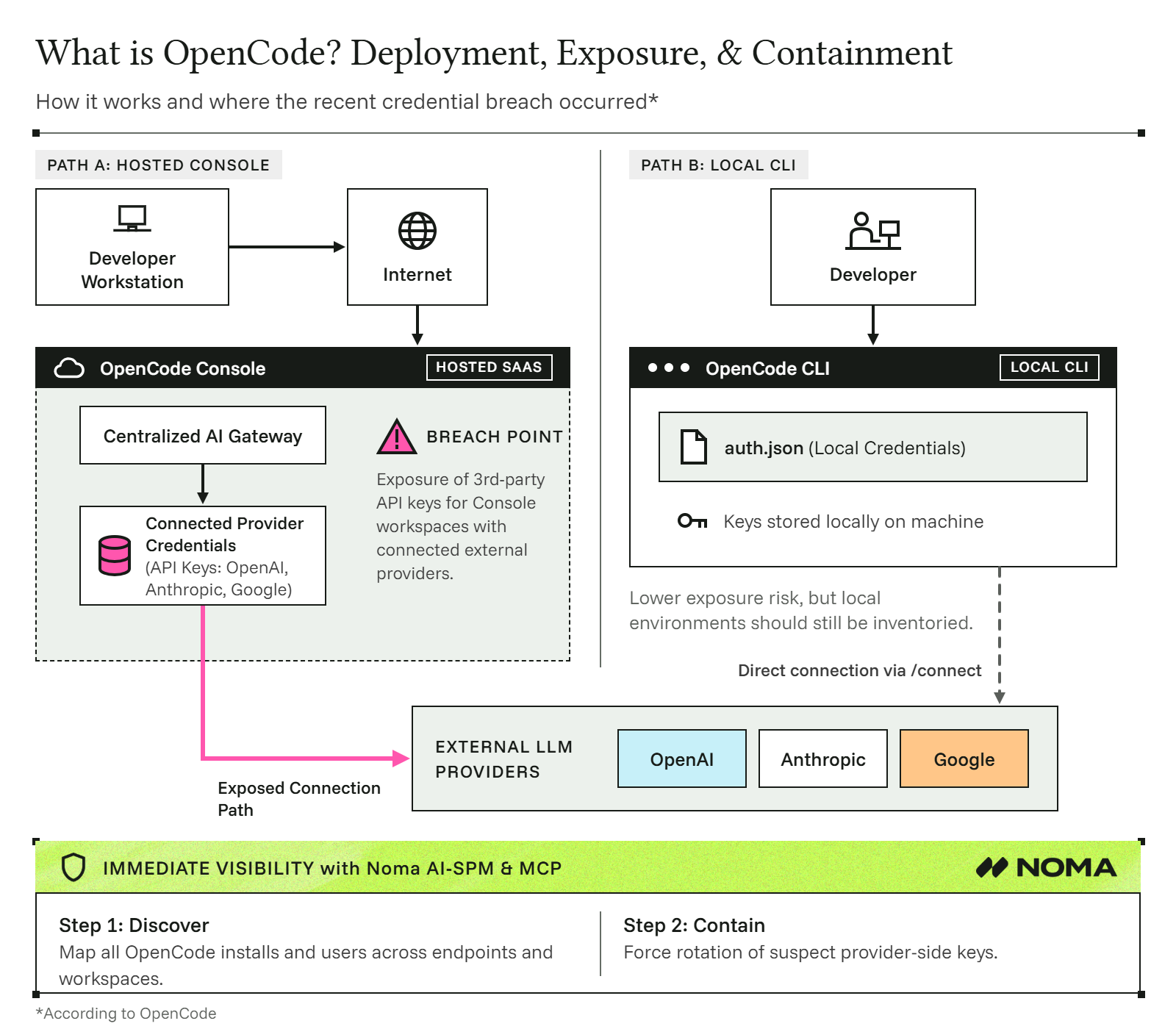
OpenCode is an open-source AI coding agent and terminal assistant designed to help developers write, debug, and refactor code directly from their command line, IDEs, or desktop environments. It operates by analyzing local project context and routing prompts to third-party Large Language Model (LLM) providers (such as OpenAI, Anthropic, and Google). Enterprises typically deploy it either through a local CLI configured directly on developer workstations or via the centralized OpenCode Console, which manages shared API keys and routes requests through a hosted gateway. The OpenCode Console is where the breach has been disclosed.
Detailed Investigation Steps for Security Teams
1. Check Usage and Your Connection Path
Determine whether your organization has active OpenCode deployments and identify the specific deployment pattern used. OpenCode operates under two distinct deployment models that carry different risks:
- Hosted Console: Saves provider credentials centrally and routes developer requests through a managed gateway. If an organization connected external providers to the hosted Console, assume keys associated with those workspaces may have been exposed. This is the primary deployment pattern OpenCode reported as affected by the breach.
- Local CLI (/connect): Stores provider keys locally in standard configuration files (e.g., auth.json) on developer workstations. However, CLI workflows configured to point back to a Console-backed provider may remain exposed. Verify whether keys were managed through the Console or strictly stored locally. Current guidance indicates that key rotation is not required for local desktop CLI installations.
2. Provider-Side Audit and Blast Radius Containment
Follow recommended guidelines for suspected credential exposure on OpenCode Console:
- Identify Accounts & Owners: Identify all accounts linked to OpenCode Console. Catalog provider project IDs, key identifiers, and human owners without logging raw secrets into shared channels.
- Revoke Console-Linked Keys: Invalidate affected keys directly at the model provider level (OpenAI, Anthropic, Google) and ensure dependent production applications update to clean, dedicated credentials.
- Audit Provider Usage: Inspect provider access logs for anomalous volume, unexpected model selections, or off-hours request spikes. Escalate unauthorized usage directly to vendor security support.
- Set Hard Spending Limits: Configure strict provider-enforced hard caps and usage alerts to halt unexpected execution in real time.
3. Long-Term Governance: Connect Agent Activity to Identity
The broader takeaway from this breach is that hosted AI provider connections represent critical security dependencies:
- Map Identity & Intent: Maintain an inventory tracking the human owner, runtime environment, and intended operational scope for every deployed agent or coding assistant.
- Enforce Least Privilege: Use separate, scoped API keys for interactive developer tools versus automated production jobs.
How Noma Users Can Instantly Identify and Contain OpenCode Risk
If you use Noma’s AI-SPM (AI Security Posture Management) or Noma MCP, you can automatically pinpoint all active instances of OpenCode across developer endpoints, cloud environments, and SaaS workspaces, mapping their credentials and containing access immediately.
Step 1: Discover All OpenCode Installations & Dependencies via Noma AI-SPM
Locate all instances of OpenCode across your AI ecosystem (including endpoint agents, CLI tools, developer IDEs, and SaaS integrations):
- Open the Noma MCP, or navigate to Noma Platform > Posture Management > Inventory.
- Query the Noma MCP to locate all users with active OpenCode components, or filter your Inventory by environment using open search.
Review the output to highlight:
- Workspace members connected to OpenCode Console gateways.
- Endpoints running local OpenCode desktop CLI instances.
Step 2: Quarantine OpenCode Console Risk & Execute Endpoint Remediation
OpenCode has reported the breach as strictly affecting OpenCode Console. Current guidance confirms that rotating local desktop CLI keys is not required.
To mitigate Console risk across managed developer machines, Noma provides structured remediation scripts designed to be deployed directly via your existing EDR/MDM tools (e.g., CrowdStrike, SentinelOne, Microsoft Defender for Endpoint):
- Download the EDR Script Package: Retrieve the EDR-compatible remediation script from the Noma Docs Portal.
- Deploy via Your EDR Platform: Push the script through your standard EDR/MDM orchestration platform to enforce endpoint-level containment across targeted machines:
- Block Gateway Connections: Prevent endpoint agents from communicating with affected OpenCode Console gateways.
- Restrict OpenCode MCP Connectors: Disable untrusted MCP connectors and agent tools on local developer environments without disrupting unimpacted local CLI tools.
- Revoke Provider Keys (Console Only): Invalidate any model provider API keys (OpenAI, Anthropic, Google) configured inside the OpenCode Console dashboard. Always revoke keys directly in the provider dashboard by simply removing them from the OpenCode Console UI does not invalidate the underlying secret.
For additional assistance securing your environment against OpenCode vulnerabilities or custom EDR script deployment, reach out directly to your Noma Technical Account Manager or request a demo to see Noma in action.
This remains a developing story. Check back regularly for further technical analysis and updates.

-optimized.webp)