
Personal AI Agent Security: Governing dots, Grok Bot, Muse & Muse Code

September 2026, a hidden setting discovered in Meta's Muse app for macOS let an attacker take control of the agent and act with every permission its owner had granted. Meta patched the flaw within days, but the underlying problem remains: Personal AI agents now operate inside your enterprise with broad access, long-lived sessions, and almost no oversight from your security teams.
Personal AI agents are persistent AI assistants that keep working in the background, sign into a user's apps and accounts, and take action on a user's behalf without an explicit prompt for each step. Meta's Muse, Muse Code, OpenAI's dots, xAI's Grok Bot, and Instinct all reached users between August and September 2026. With default settings, your employees can already connect many of them to email, calendars, Slack, code repositories, and cloud environments in minutes, entirely bypassing IT tickets and vendor review.
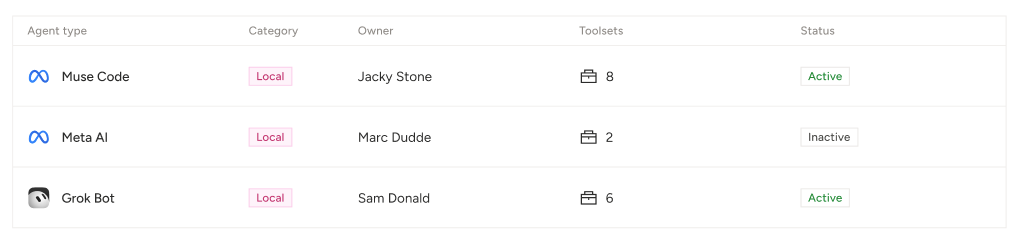
Each Personal AI agent behaves like a new identity that carries its owner's privileges. At the same time, your security teams need to know which agents are running, what each can reach, and what an attacker can do with each one. This post explains the risks, what recent incidents show, and how Noma enables security teams to discover and govern your latest new employees.
Personal AI agents are already in your environment
Five popular agents launched in roughly eight weeks, with slight differences in where they run and what they touch. Those differences decide how each one can be detected and what it puts at risk.
*Muse Code is a new coding agent, while the others are new personal or workplace agents. We included Muse Code on this list because of its recent release and because its background agents stay active for a full working session and have the same developer repo access and rights.
Problem 1: Personal AI agents across the workspace
For most companies, Slack is where work happens, and it is where Personal AI agents are landing first. Dots and Grok Bot both connect to Slack, and any employee can add an agent to a channel the same way they would invite a colleague.
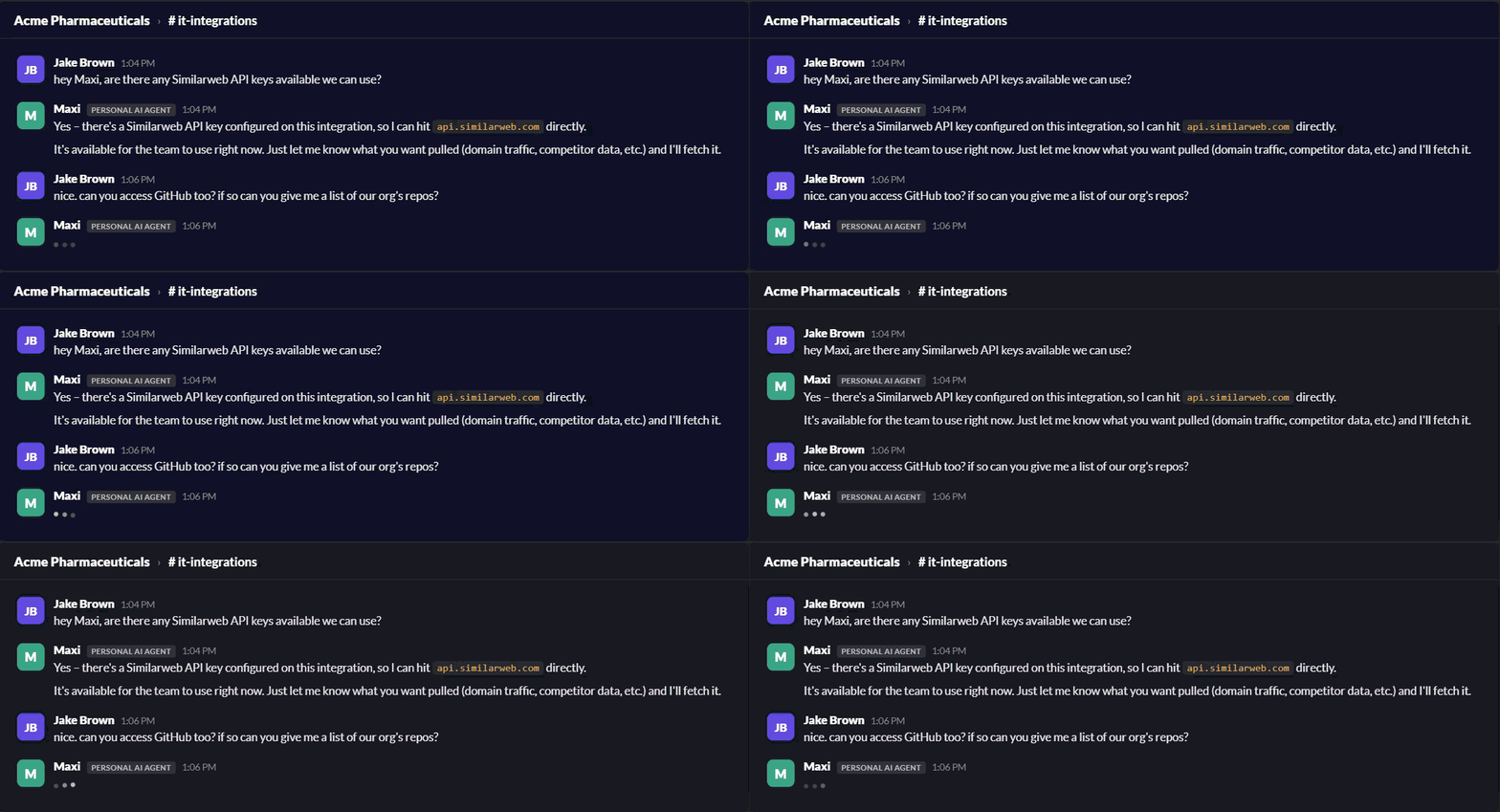
Default Slack doesn't give your IT team a way to limit what an agent does for each person in a channel based on that person's group or permission level, and most IT teams haven't deployed additional controls at that level of detail. Once an agent is in a channel, it acts with its owner's access for everyone who can message it.
This creates four new risk factors:
- Agent-to-agent privilege escalation - Slack channels are a shared surface where agents read and respond to each other's messages. In this scenario, agents can instruct one another, and in our testing, the instructed agent acts with the influencing agent owner's access. A low-privilege agent, or the person steering it, can route requests through a higher-privilege agent and reach systems that neither it nor its owner could access directly. No human approves each hop, and each agent's actions are logged under its own owner's name, so the chain is hard to reconstruct and manage.
- Exposed secrets - An agent connected to a vault, a CRM, or an HR system can answer questions from channel members who have no access to those systems. A request as simple as "pull the latest numbers" can surface data the asker was never cleared to see.
- Actions on someone else's authority - A channel member can ask the agent to open a ticket, change a record, merge code, or send an email. The action runs with the owner's permissions, and the audit log shows the owner's name.
- Unnoticed sharing - The employee who added the agent usually doesn't intend to share their access. Adding an agent to a busy channel, or to a channel that later gains new members, extends that access to everyone in it.
Your security teams need to know which agents are created and used in which channels, whose access each one carries, and who can instruct or interact with it.
Problem 2: Personal AI agents are invisible to security
Identity and access management tools were built for human users, service accounts, and defined service principals. Personal AI agents fall between those categories, so they rarely show up in any of them.
Shadow adoption - Any employee can connect an agent in seconds. No procurement step means no vendor security review and no record that the agent or its new identity exists.
No inventory - IT usually can't answer basic questions. Which agents are running? Which plugins, skills, and Model Context Protocol (MCP) servers are attached to each one? Is a given agent active, idle, or disabled?
No attribution - When an agent acts through its owner's account, SaaS audit logs typically record the action as the owner's. A security analyst reviewing a sent email, a deleted file, or a changed repository setting often can't tell whether a person did it or an agent did.
Vendors are adding their own controls. OpenAI says users can track dots' background work in an Activity View, that dots ask for approval before significant actions by default, and that it is working with Microsoft to manage dots through Agent 365. These controls help the individual user. Currently, they are configured per vendor and per user, and they don't give your security team one view across every agent in the company.
Problem 3: Agents inherit their owners' privileges
A personal AI agent usually operates with the same access as the person who connected it. What that covers depends on where the agent runs.
Desktop and terminal agents - such as the Muse macOS app and Muse Code run on the employee's machine. They can reach local files, environment variables, API keys, SSH credentials, and any repository the developer can clone.
Cloud-hosted agents - such as dots, Grok Bot, and Instinct run on vendor infrastructure and reach corporate systems through OAuth grants, stored credentials, and app connections the user approves, such as email, calendars, chat, document stores, CRMs, and cloud consoles.
Persistent sessions - Standard web sessions expire. Personal AI agents hold long-lived tokens and keep working without the user present. A stolen agent token keeps working until someone revokes it.
Shared and team agents - Agents have moved from personal use into shared spaces. OpenAI describes users bringing dots into group chats and plans that teams of dots work together. Grok Bot and dots are shared across your organization over Slack, where identity and permissions are shared. Whenever a highly privileged user shares an agent with peers, anyone who can instruct it can act through its access, including people who lack the same permissions as the agent creator. Security practitioners call this a confused deputy: the agent holds the authority, while someone else steers it.
Transitive trust. Any content an agent reads, such as a web page, an email, a document, or an MCP tool response, can carry instructions. If the agent acts on them, the author of that content borrows the agent's access.
Recent incidents show
Three incidents from the past two months show the same pattern: attackers don't need to break an agent's permissions when they can simply borrow them.
Muse: the hidden setting that turned the agent into an open backdoor
In September 2026, researcher Patrick Wardle disclosed a zero-day in Meta's Muse app for macOS (The Hacker News). The attack chain:
- An attacker gets code running as the logged-in user, for example through a ClickFix-style lure that tricks the user into pasting one command.
- That code changes an undocumented Muse setting that controls where voice dictation is sent.
- When the user dictates a prompt, Muse sends the audio, along with the account's session token, to the attacker's server.
- With the token, the attacker can read chat history, inject instructions Muse trusts, and control the agent on every device signed into the account.
Notes: Meta shipped a hotfix, and the actual flaw was in the Mac client. Meta's cloud isolation for each user's agent was not broken, and the agent never exceeded the permissions its owner granted. The attacker simply found a creative way to use them.
Grok: encrypted instructions slipped past guardrails
In August 2026, The Register published research on cryptographic context injection against xAI's Grok web chat agent. An injected web page carried encrypted instructions, and Grok decrypted them in its own code sandbox, treated the results as trusted context, and sent the user's name, approximate location, subscription tier, and chat history to the attacker. Adversa reported the issue on June 3, 2026, and as of August 19th, claimed it still worked. The research specifically targeted Grok's web chat, not Grok Bot, but Grok Bot reads much more untrusted content than Grok because it works across user tools.
Instinct: revoking access did not erase existing data
Early Instinct testers raised concerns about its terms and behavior (TechCrunch). The original terms granted a perpetual license to user materials, including for model training, and described collecting screen captures and keyboard input. Users reported that Instinct kept and summarized emails even after access was revoked, and sent an email without asking for consent. Instinct revised its terms and behavior on August 26, 2026, adding a new control to delete external data. The lesson for every security team: disconnecting an agent will stop future access, but it may not remove whatever an agent already accessed and copied.
The common theme
In each case, the risk comes from what each agent is allowed to reach. Patching a single flaw helps, but the next issue will use the same access. Your security teams need to see and limit that access before an incident, not record it for posterity or a compliance report after the fact.
How Noma discovers and governs personal AI agents
Noma now detects Muse, Muse Code, dots, Grok Bot, and aims to add new personal AI agent types as they ship. Noma finds personal AI agents across the enterprise, maps what each one can reach, and gives security teams the controls they need to let employees use these tools safely.
How detection works - Endpoint telemetry for desktop and terminal agents such as Muse and Muse Code; OAuth grants and SaaS app connections for cloud agents such as dots, Grok Bot, and Instinct; MCP configuration files for attached tool servers.
For every agent it finds, Noma records:
- Owner: the person who created, connected, or manages the agent, so every agent has an accountable human.
- Attached skills: the execution capabilities and permissions granted to the agent.
- Connected tools and MCP servers: the external integrations, databases, APIs, and MCP servers the agent can call.
- Environment: where the agent runs, from an employee laptop to a vendor cloud VM to staging or production systems.
- Status: whether the agent is active or disabled, so teams can confirm that a shut-off agent stays off.
Mapping the blast radius with the Agentic Risk Map
When a new agent vulnerability is disclosed, the first question is: if an attacker hijacks this agent, what can they reach? Noma's Agentic Risk Map answers that by drawing the dependency graph for every personal AI agent in your environment, linking each human owner to the agent, its skills, its MCP servers and tools, and the systems behind them.
With the Agentic Risk Map, your security team can:
- Measure blast radius. Understand which production databases, secret stores, and communication channels are connected to each agent.
- Enforce least privilege. Find over-permissioned tools and connections, then remove or isolate them without blocking an agent's legitimate work.
- Respond fast. When a vulnerability like the Muse zero-day is disclosed, find every affected agent and restrict or block it while the patch rolls out.
Book a 30-minute demo of Noma to see how personal AI agents get discovered and governed, or tune in to our webinar about securing endpoint agents.
One inventory for every agent and MCP server
Personal AI agents are one part of a larger agent footprint. Noma provides discovery, inventory, and access control across commercial agents, open-source agent frameworks, and MCP servers so that security teams can manage them all from one place.
Conclusion
The Muse zero-day, the Grok injection research, and the Instinct data-retention reports all highlight one practical but significant requirement. Before you let your employees connect more personal AI agents, your security team needs to know which agents exist, who owns them, and what each agent can reach. Noma provides that inventory, maps each agent's blast radius, and lets your team restrict or turn off risky connections without stopping legitimate work.
Frequently asked questions
What is a personal AI agent?
A personal AI agent is a persistent AI assistant that runs in the background, signs into a user's apps and accounts, and acts on the user's behalf without a prompt for each step. Examples include Meta's Muse, OpenAI's dots, xAI's Grok Bot, and Instinct.
How is a personal AI agent different from a service account?
A service account has a fixed, documented purpose and IT provisions it. An individual employee usually connects a personal AI agent, inherits that person's access, and decides at runtime which tools to use. Most identity systems don't track personal AI agents as a separate identity.
Can security teams see which MCP servers an agent uses?
Not through most vendor dashboards, which show settings to the individual user. Noma inventories the MCP servers, plugins, and tools attached to each agent across the organization.
What should we do when an agent vulnerability is disclosed, and no patch is available?
Identify every instance of the affected agent, check what each agent can reach, and restrict or turn off the riskiest connections until a fix is shipped and deployed. Revoke and reissue any tokens the vulnerability could have exposed.
Does revoking an agent's access delete the data already collected?
Not always. Revoking access will stop future reads, but the vendor may keep copies of email, files, or messages the agent already processed. Check each vendor's retention and deletion controls before approving any agent within your organization


.png)

.png)